
Orico Capture Card Price in Bangladesh
Explore ORICO capture cards at Techland BD for video recording, live streaming, gaming, and content creation. Compare the available model by its video input, output resolution, connectivity, compatibility, and supported recording features. Check the product specifications to find an ORICO capture card that suits your setup.
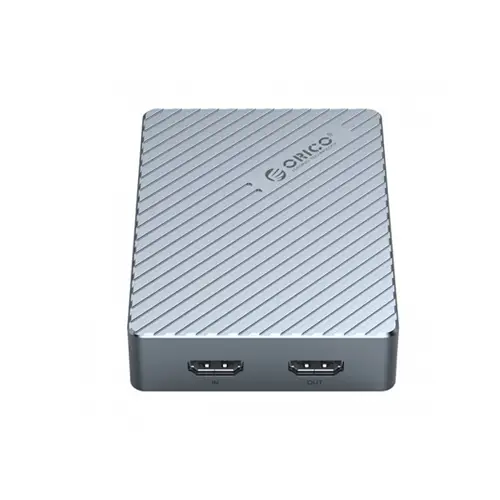
ORICO HVC-1080 HDMI TO USB3.0 VIDEO CAPTURE CARD
- Input: USB-A 3.0 x1, HDMI x1, Audio x2
- Output: HDMI x1
- Record: 1080P 60Hz
- Material: Aluminum Alloy
Showing 1 out of 1 products
Understanding ORICO Capture Cards
ORICO capture cards are designed to help users transfer video signals from compatible devices to a computer for recording, streaming, and other content creation activities. They can be useful for gamers, streamers, educators, and video creators who want to capture footage from supported devices.
An ORICO capture card can connect compatible video sources, such as gaming consoles or cameras, to a computer. The captured video can then be used with supported recording or streaming software. Before choosing a model, it is important to understand its connection types, supported resolutions, and device compatibility.
ORICO Capture Cards for Gaming and Live Streaming
Capture cards are useful for gamers who want to record or stream gameplay from compatible consoles and other video sources. By connecting the source device to a computer through a capture card, users can work with supported streaming and recording applications.
For live streaming, compatibility with streaming software and the computer's operating system is important. Users should also check the supported video resolution, frame rate, and input connections to ensure that the capture card meets their requirements.
Video Quality and Resolution
Video resolution is an important consideration when selecting a capture card. Different models support different input and output resolutions, recording capabilities, and frame rates. Some capture devices may support higher-resolution video signals, while their actual recording output may depend on the model and connection specifications.
Before purchasing an ORICO capture card, review the product details carefully. Make sure its supported resolution and frame rate match the requirements of your camera, gaming console, or other video source.
Connectivity and Device Compatibility
Connectivity determines how a capture card works with other devices. Depending on the model, an ORICO capture card may use HDMI and USB connections. Check the available ports and supported connection standards before selecting a product.
Compatibility with your computer, operating system, video source, and recording software is equally important. A suitable capture card should work with the devices and applications you plan to use. Always review the manufacturer's compatibility information before making a purchase.
Choosing the Right ORICO Capture Card
The right ORICO capture card depends on your intended use. Gamers may priorities console compatibility, video quality, and smooth recording. Streamers may focus on software support, resolution, and frame rate. Content creators may need a device that works with their camera or other video equipment.
It is also useful to consider your computer's available USB ports and system requirements. Comparing these details before purchasing can help you avoid compatibility problems and select a capture card that fits your setup.
Buy ORICO Capture Cards from Techland BD
Techland BD offers an online platform where customers can explore available ORICO capture card products and review their specifications. You can check product details, connectivity options, supported resolutions, and compatibility information before deciding which model is suitable for your needs.
Visit the ORICO capture card category at Techland BD to see the currently listed product. Check the product page for updated pricing, stock status, and other details before placing your order.
ORICO Capture Card Price List in Bangladesh 2026
Frequently Asked Questions
What is an ORICO capture card used for?
An ORICO capture card is used to capture video signals from compatible devices and transfer them to a computer for recording, streaming, or other video-related tasks.
Can I use an ORICO capture card for gaming?
Yes, a compatible capture card can be used to capture gameplay from supported gaming consoles or other video sources. Check the device compatibility and supported resolution before purchasing.
Can an ORICO capture card be used for live streaming?
A compatible ORICO capture card can be used with supported streaming software to capture video from an external source. Software and operating system compatibility should be checked before use.
What should I check before buying an ORICO capture card?
Check the input and output connections, supported video resolution, frame rate, computer compatibility, operating system requirements, and supported recording features.
Does every ORICO capture card support 4K recording?
No. Recording and pass-through capabilities vary by model. Review the individual product specifications to confirm its supported input resolution, output resolution, and recording capabilities.
